Email Security: Solving the Main Cause of Data Breaches
Key takeaways from this article on email security threats:
- Phishing and related tactics like whaling, vishing, and quishing account for more than 80% of email-related security threats, disproportionately affecting smaller businesses given limited resources and expertise.
- Combining tools like multifactor authentication, email filtering, authentication protocols, and areal-time threat detection, along with continuous employee training is essential for defending against advanced email threats such as spoofing, malware, and business email compromise.
- Managed service providers offer real-time threat detection, employee training, and incident responses, making them key partners in helping organizations maintain strong cybersecurity hygiene and mitigate email-based risks.
Email is an indispensable tool in office collaboration and communication. That’s true even in the era of information overload, in which users’ inboxes are flooded with messages.
But malicious actors continue to pose email security threats that cause significant data and financial losses. Small and midsize businesses (SMBs) are disproportionately affected, suffering an average loss of $328,000 per incident.
Email phisdhing—in which scammers send fraudulent email messages to trick recipients into revealing personal data—remains a distressingly common email security threat vector. But today, attackers are exploiting other inventive methods as well. Tactics include quishing (using QR codes to send users to scamming sites), whaling (in which malicious attackers target executives), and vishing (in which scammers used voice-based messages to dupe recipients into revealing sensitive data or sending money).
According to Zivver’s “Widening disconnect between email security and risk management” report, phishing accounts for more than 80% of reported security incidents in 2024. Consider, too, that according to the “World Economic Forum’s 2025 Global Cybersecurity Outlook, 72% of respondents cited an increase in organizational cyber-risks, with ransomware remaining a top concern.
“Small and medium-sized businesses (SMBs) are more susceptible to an email vulnerability because of limited internal resources ,” said Jayson Saumer, product specialist at Integris. “Given the rapid evolution of today’s cyberthreats, email security in particular necessitates frequent updates and a high level of specialization to remain current and effective.”
That’s why organizations need to shore up email cybersecurity strategy, through software tools, policies and procedures that reflect their industry’s data requirements, and employee training. Some of these areas may require expert guidance—which is where a managed service provider may prove invaluable.
Types of email security threats
| Email threat | Solution |
| Email phishing. With this type of cyberattack, malicious actors can send fraudulent emails to trick recipients into revealing sensitive personal information, such as passwords, credit card numbers, or other login credentials. Email messages often appear to come from legitimate sources and use deception, such as spoofed sender addresses and fake websites, to steal personal data, creating financial loss or identity theft. | Effectively addressing email phishing involves a combination of strong user habits and robust technical defenses. Key strategies include enabling multifactor authentication (MFA), using strong unique passwords, and being cautious with links and attachments. Additionally, organizations can implement technical solutions like advanced email filtering, anti-malware software, and user training to provide a comprehensive defense against phishing attacks. |
| Spear phishing and whaling. In these kinds of email security threats, malicious attackers target specific people. | A combined approach merges employee training with tools to identify this tactic. Key solutions include continuous security awareness training to help users spot malicious emails, implementing multi-factor authentication (MFA) to add an extra layer of security, and deploying advanced email security solutions with features like secureemail gatewaysand email authentication protocols (SPF, DKIM, DMARC) to filter out threats before they reach inboxes. |
| Vishing, or voice phishing, is a scam that uses phone calls to steal sensitive information. Malicious attackers scam recipients with faked voice messages—often created with AI—to trick users into sending sensitive data or money. | In an era of largely digital communication, vising has gained currency to catch users unaware. It requires proactive prevention and immediate action if a user is targeted. To prevent vishing, users should be skeptical of unknown callers, never give out personal information over the phone, use call-blocking tools, and register on the National Do Not Call Registry. Victims should change compromised passwords, contact institutions such as banks, and report the incident to the FTC and local authorities. |
| Malware attachments. Malicious files can be attached in applications such as Word or Acrobat that when opened can compromise a user’s computer or sensitive data. | Key solutions include using up-to-date antivirus and email filtering tools, with advanced features like sandboxing and attachment restrictions. Just as important, it must be paired with user education on identifying and avoiding suspicious attachments. |
| Business email compromise. Malicious actors increasingly use these tactics where they impersonate executives or legitimate business partners to trick employees into sending money, providing sensitive information, or making fraudulent transactions. | Key solutions include implementing MFA, email security tools such as DMARC (an email authentication protocol) with a reject policy, establishing strong financial transaction approval procedures, and consistently training employees to identify and report suspicious emails. |
| Email spoofing. More than 90% of the world’s top email domains are vulnerable to email spoofing. With spoofing, a malicious actor can falsify the sender information in an email header, making it appear to come from a legitimate or trusted source. | The solution to email spoofing involves implementing email authentication protocols such as SPF, DKIM, and DMARC, along with undertaking vigilant user education on how to recognize and report suspicious emails. Anti-spam and anti-virus solutions, keeping systems updated, and enabling MFA. |
Table 1: Email threats and cybersecurity solutions to address them
The key for organizations to prevent email security threats from having impact on data is to develop strong cybersecurity hygiene. Let’s explore the key components—and why managed service providers can help implement.
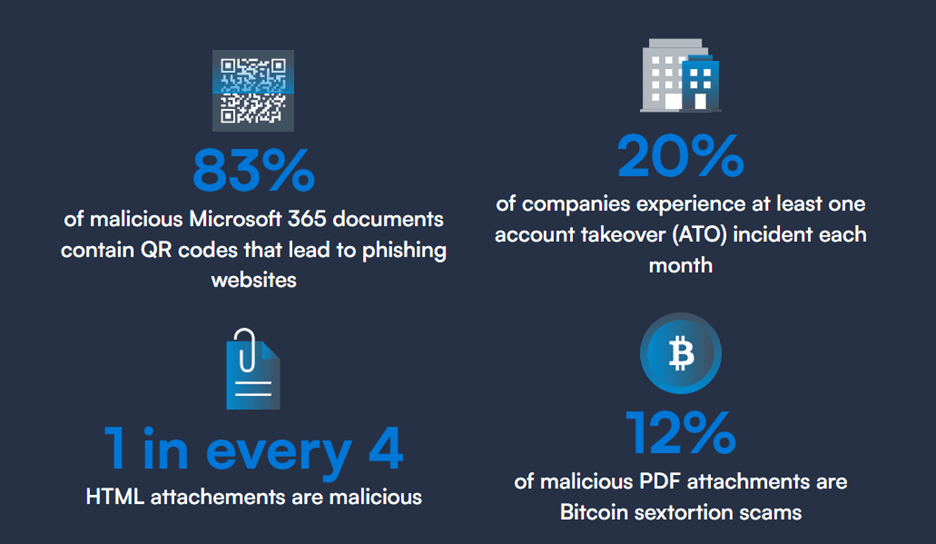
Figure 1: Malicious actors take advantage of various threat vectors, such as QR codes and attachments.; Source: “2025 email threats report,” Barracuda, 2025.
Types of email security threat strategies
Authentication and access controls
Multifactor authentication (MFA). Enforce MFA for all email accounts. With MFA, users are required to provide two or more verification factors to gain access to an account or system, adding extra layers of protection beyond a simple password.
Strong password policies. Strong passwords aren’t just long and hard to remember. They use complex, unique passwords that combine uppercase and lowercase letters, numbers, and symbols, require regular password changes, and prohibit reuse. Strong password policies also include mandatory MFA, establish password expiration rules, and implement account lockout after failed attempts. Finally, organizations with strong password policies often use password managers, which encrypts passwords in a secure digital vault.
Email content protection
Email encryption. There are two common types of email encryption:
- Encryption in transit (e.g., TLS/SSL/STARTTLS)
- End-to-end email encryption or public key encryption
Organizations with sensitive data—such as law firms’ client and case data or banks’ customer data—must institute tools to protect this data in transit and at rest.
File-sharing platforms. Additionally, organizations with strong email content protection policies often require secure file-sharing platforms for confidential data, and discourage employees from sharing passwords, credit card information, or personally identifiable information (PII) in unencrypted emails.
Threat detection and awareness
Phishing detection. As Figure 2 indicates, companies expect address email security threats with AI, using the tech to identify phishing (49%) and of real-time threat detection and recommendations (49%). But employees also need continuous training continue to need training to identify suspicious emails and new scammer techniques.
Anti-phishing tools. According to the forthcoming Integris “2025 technology adoption and spending” survey data, only about a third of 1,500 respondents use email filtering tools (36%) and real-time email scanning (35%). More than half of these respondents (57%), however, also reported an email-based data breach. These kinds of real-time monitoring technologies, paired with employee training, are key for combatting email-based threats. Email filtering and scanning are critical to stay ahead of today’s email security threats.
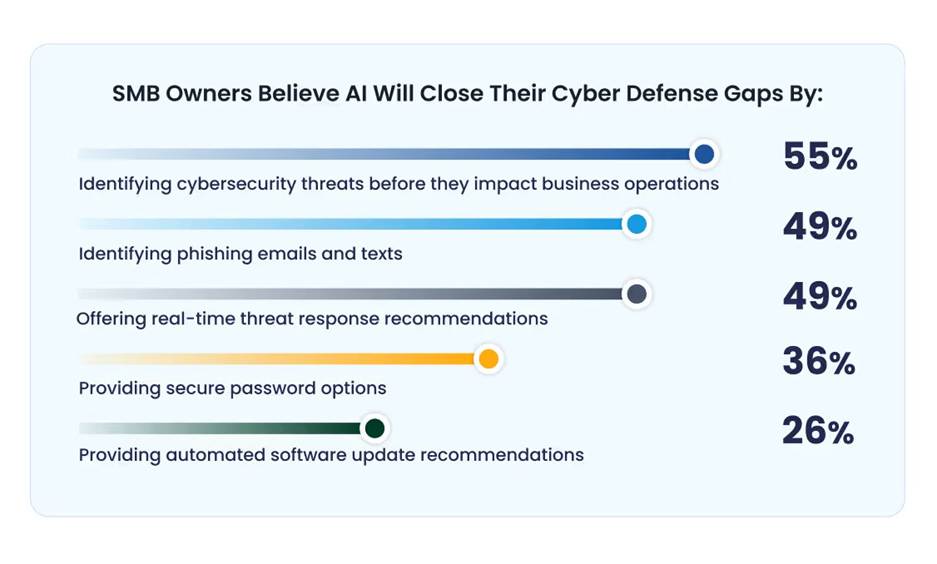
Figure 2: Small and midsize companies see AI as a tool to close the gap on cyberthreats;
Source: VikingCloud, “2025 SMB Threat Landscape Report: Small- and Medium-Sized Businesses, Big Cybersecurity Risks,” March 2025.
AI-enabled email monitoring. Increasingly, IT professionals see AI as an enabler as they tackle malicious threats. Nearly half (49%) of respondents to a VikingCloud survey see artificial intelligence as an effective tool to identify phishing email and texts and to provide real-time response recommendations.
Device and endpoint security. Email data is only as secure as the device on which it resides. And indeed, 80% to 90% of all successful ransomware compromises originate through unmanaged devices, according to “Microsoft Digital Defense Report”. Organizations must deploy antivirus scanning and anti-malware software on laptops and mobile devices. They should also enforce screen-locking policies and disk encryption, and keep all email platforms and operating systems up to date.
Email account management
Least-privilege access. Organizations should limit access to email accounts based on a user’s organizational role. Least-privilege access is when organizations give a user or group the minimum level of permissions needed to perform a given task. This default is also key to minimizing data breaches.
User offboarding. When users leave an organization, IT departments should be ready to decommission their email and login credentials. IT staff can set up automated workflows that initiate on an employee’s last day of work, such as Entra, for example.
Monitoring account activity. Organizations need real-time insight into account activity and the ability to enable logging and alerts for unusual behavior.AI tools are a clear asset in this regard, and managed service providers are already using AI-enabled email monitoring to detect, mitigate, and even proactively prevent threats.
Email disaster recovery and business continuity
Backup and recovery and email archiving. Email backup provides for disaster recovery and short-term protection of email messages, creating a copy of your emails to restore them after loss.
Email archiving, conversely, is for long-term, tamper-proof storage of all communications, designed for legal compliance, e-discovery, and easy retrieval over extended periods. While a backup can be used for data recovery, it’s not the solution for long-term retention and legal purposes because it can be altered or deleted. Archiving focuses on preserving every message for future reference and legal requirements, often using journaling to capture every email in real-time.
User training and policy. While tools and policies are critical to preventing email cyberthreats, human awareness and behavior are by far the most critical aspects of ensuring email security.
But there are persistent gaps in email security awareness training. According to 2024 Hornet data, 25% of organizations still don’t offer cybersecurity training. According to email vendor Mimecast estimates, human error contributes to 95% of cyberattacks. Organizations may lack the staff and expertise to develop a robust cybersecurity training program. Regular employee training is a key area in which MSPs can provide substantial added value. They can not only train staff but document clear email policies and develop cybersecurity testing, such as simulated phishing attacks, to improve staff readiness.
How MSPs respond in the wake of an email breach
When an email breach occurs, MSPs follow a structured incident response plan to contain the damage, eradicate the threat, and restore services for their clients. This process is crucial for minimizing downtime, reducing financial losses, and protecting their clients’ reputations.
User reporting. An effective system, such as a “report phishing” button in the email client, allows employees to flag suspicious emails, which helps the MSP detect active threats.
Threat analysis. Once a potential breach is identified, the MSP investigates the scope of the attack to determine which accounts, systems, and data have been compromised
Purge malicious emails: MSPs configure email applications to search for, quarantine, and purge malicious messages.
Reset credentials: If user passwords have been compromised, accounts must be reset. If a data breach occurs, an MSP may enforce a password reset for all users. MFA is enabled or reinforced for high-risk and newly created accounts. Further, MSPs may use identity threat detection and response (ITDR) to lock down an account automatically if it suspects malicious activity.
Remove persistence mechanisms: Organizations may not realize that there are backdoor accounts that a malicious attacker has created to maintain access. An MSP can identify and deactivate these accounts.
Patch vulnerabilities: MSPs can identify the source of the breach—whether through a nefarious link, attachment, or other source, and address vulnerabilities.
Employee communications. MSPs can also provide alerts about malicious activity and provide guidance to employees to prevent further losses.
MSPs: Your partner can help ward off email security threats
Cyberthreats, including phishing and malware, can strike at any time. MSPs can provide around-the-clock monitoring and management—often with AI-enabled tools—to detect and respond to threats in real-time, which is not feasible for most small businesses.
MSPs use a proactive strategy to prevent issues. They deploy advanced tools, perform vulnerability scans, and apply patches to close security gaps before they can be exploited. But if a breach is detected, MSPs can follow a structured process to minimize data loss, identify the source, and alert the organization.
Finally, MSPs are uniquely positioned to develop employee training and education to prevent breaches. Given that humans participate in such a majority of cybersecurity breaches, MSPs can help humans forward organizational cybersecurity hygiene.
“Businesses gain access to comprehensive expertise and seasoned professionals when outsourcing email security to MSPs,” Saumer emphasized. “This allows them to use advanced security tools and methodologies, keeping the latest protective measures against evolving threats, as well as ensuring compliance with relevant regulations.” Organizations also gain safe access to advanced tools like AI that detect and respond to all types of threats. And MSPs also provide tailored training testing to ensure that employees safeguard email security and understand evolving email security threats.
Integris offers two tailored options for email security: Core Email Security delivers AI-powered protection against phishing, malware, spam, and email-based data loss prevention, while Advanced Email Security adds reporting and archiving to meet strict compliance and governance needs for regulated industries.