

Team Integris
Team Integris is made up of writers, editors, and subject matter experts from across our organization. Whether we're covering cybersecurity trends, IT best practices, or the technology challenges facing businesses, our goal is the same: to deliver clear, helpful content grounded in real-world experience.
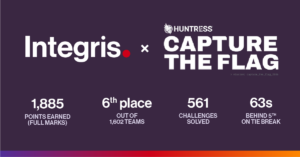
Integris places top 10 in Huntress global cybersecurity competition
Integris placed sixth out of more than 1,600 teams in the 2026 Huntress Capture the Flag competition, bringing together cybersecurity talent from across Integris and First Focus. The achievement marks an exciting milestone following Integris’ acquisition of First Focus earlier this year. With cybersecurity expertise spanning the United States, Australia, New Zealand and the Philippines,…

What to look for in a managed IT provider
What to look for in a managed IT provider? Look for a provider that understands your business, gives you clear relationship ownership, responds when you need help, provides access to the right expertise, communicates clearly, thinks proactively, and helps you get more value from technology over time. A managed IT relationship sits underneath day-to-day work,…

The AI ideas our customers want to build with a $100K investment
Explore the Integris AI Investment Fund and its aim to eliminate operational friction with innovative AI solutions.

CORE Managed Services: How Integris turns AI and automation into real returns
Most managed IT contracts are built to answer one question: are the systems running? That matters. It’s also not the same question as “is this actually making my business more productive,” and a lot of businesses only notice the gap once they’ve been paying for Microsoft 365 and AI licenses for a year with nothing…

Seven Question Quiz to Protect Your Law Firm: Does Your Legal Practice Pass the Test?
Is your legal practice safe from cyber criminals? Take this quick seven question quiz and find out if your firm makes the grade.
Create a Desktop Shortcut for OneNote | Integris
Here is a step-by-step process to creating a shortcut to your OneNote notebook or notebook section.